
Getting Started
LockMCP turns your platform's APIs into governed tools that AI clients like Claude can call — with your own users, your own roles, and your own data staying under your control. Every connection you create picks one of three ways for your users to be recognized, and you can run more than one connection at once if you need to.
The three ways to connect
| Identity model | How a user is recognized | Best for |
|---|---|---|
| Identity Brokering | Users sign in through LockMCP's own login directly. No tenant-side auth work at all. | Getting connected fastest, with no existing identity system to integrate. |
| Token Exchange | You register your identity provider once, and LockMCP federates it into its own login. Your users sign in with their existing accounts. | Teams that already run an identity provider and want their users to keep using it. |
| Tenant Delegated | Your application owns the user directory and its own login page. LockMCP redirects to your login, and your backend issues short-lived codes the hub exchanges for session tokens. | Full control over the login experience, using your existing user accounts. |
You pick this per connection, in Step 1 of the connection wizard — so one workspace can run a Tenant Delegated connection alongside an Identity Brokering one if you need to.
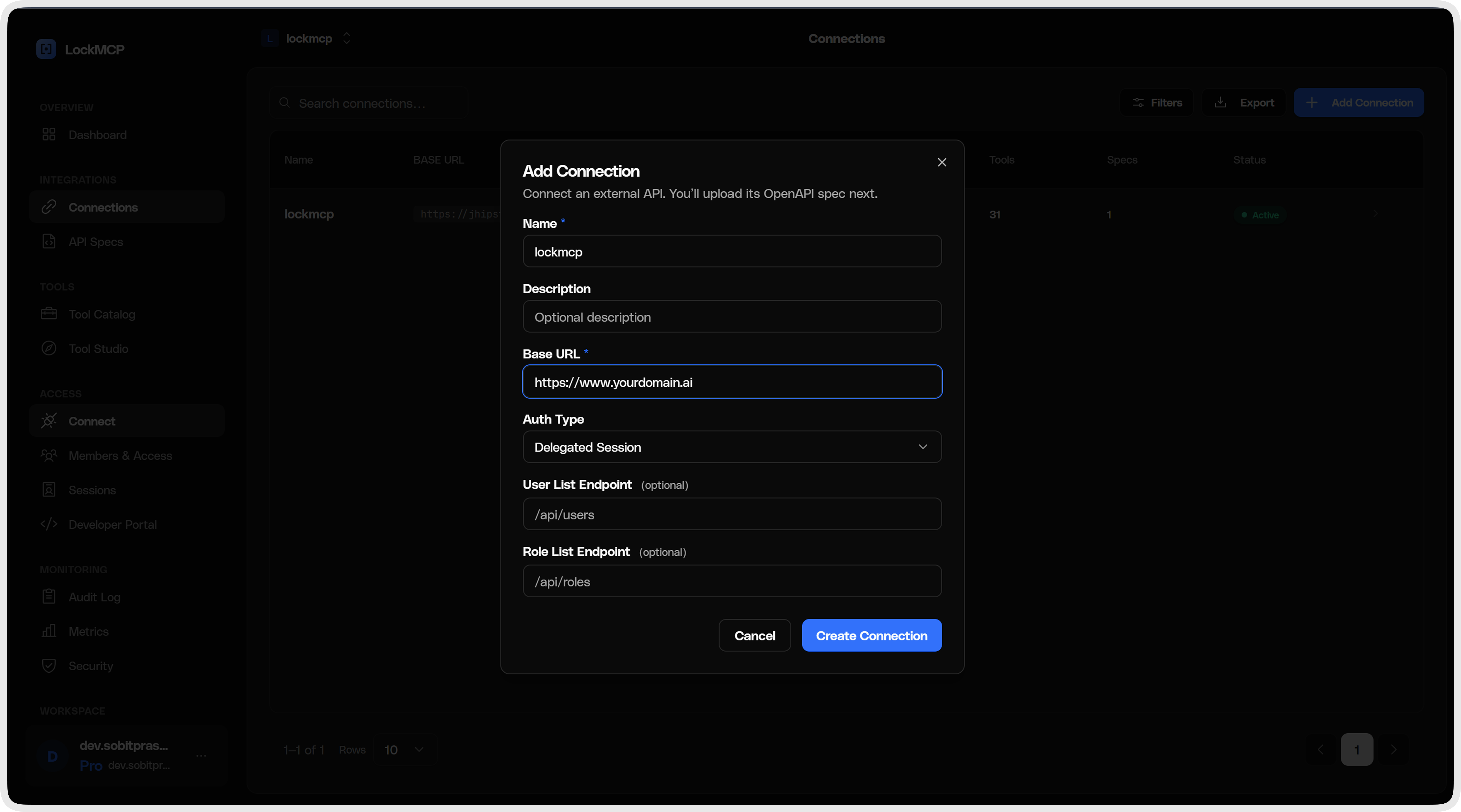
Not sure which to pick? Start with Identity Brokering — it needs nothing from your side and you can create a second connection with a different model later.
Where to go next
| If you chose… | Read |
|---|---|
| Identity Brokering | Identity Brokering overview → configuration |
| Token Exchange | Token Exchange overview → configuration |
| Tenant Delegated | Tenant Delegated overview → Contract Specification |
The rest of this page covers Tenant Delegated, the model with the most moving parts — your backend implements a small contract of its own. If you picked one of the other two, follow the links above instead.
The Contract Specification is the normative source of truth for the Tenant Delegated integration — exact schemas, the HMAC formula, token formats, TTLs, and error codes. The pages that follow are how-to guides with per-language examples; where they differ from the spec, the spec wins.
Tenant Delegated: how it works
Tenant Delegated is ideal for platforms that already have their own user management and want to add MCP tool access without migrating users to a new identity provider. LockMCP acts as a broker — it redirects users to your login page, and your app issues short-lived auth codes that the hub exchanges for session tokens.
Architecture
┌──────────────┐       ┌──────────────┐       ┌──────────────┐
│  MCP Client  │       │   LockMCP     │       │  Tenant App  │
│ (Claude,     │◄─────►│  (Hub)       │◄─────►│  (Your App)  │
│  ChatGPT)    │       │              │       │              │
└──────────────┘       └──────────────┘       └──────────────┘
      │                       │                       │
      │  1. POST /mcp         │                       │
      │  ──────────────►      │                       │
      │  2. 401 + PRM         │                       │
      │  ◄──────────────      │                       │
      │  3. OAuth flow        │                       │
      │  ──────────────►      │                       │
      │                       │  4. Redirect to       │
      │                       │     /mcp-login        │
      │                       │  ──────────────►      │
      │                       │                       │
      │                       │  5. User logs in      │
      │                       │  ◄──────────────      │
      │                       │  (code + redirect)    │
      │                       │                       │
      │                       │  6. Exchange code     │
      │                       │  ──────────────►      │
      │                       │  (HMAC-signed)        │
      │                       │                       │
      │                       │  7. Session token     │
      │                       │  ◄──────────────      │
      │                       │                       │
      │  8. Bearer token      │                       │
      │  ──────────────►      │                       │
      │  9. Tool results      │  10. Validate token   │
      │  ◄──────────────      │  ──────────────►      │
      │                       │  ◄──────────────      │
      └──────────────────────────────────────────────┘
Prerequisites
Before you begin a Tenant Delegated connection, make sure you have:
- A user directory — your app must be able to authenticate users (email/password, SSO, etc.)
- HTTPS endpoints — your app must be publicly accessible over HTTPS
- HMAC shared key — provided by the hub admin during tenant onboarding (64-character hex string)
Quick-start checklist (Tenant Delegated)
- [ ] Read the Contract Specification — the normative reference
- [ ] Set up environment variables
- [ ] Implement HMAC signature verification
- [ ] Implement session token management
- [ ] Build the 5 API endpoints (+ 2 optional:
/api/mcp/users,/api/mcp/roles) - [ ] Build the login page at
/mcp-login - [ ] Register your tenant on the LockMCP admin panel
- [ ] Pass the hub's conformance check during onboarding
- [ ] (Optional) Enable enum injection to scope tool parameters to each user's accessible resources — eliminates 403-retry loops for multi-tenant AI workflows